Enterprise Admin Guide
This guide is for enterprise IT administrators and super administrators who will deploy, operate, and manage the global configuration of 丰盘ECM (referred to here as you or the administrator). If you are looking for instructions on routine features such as configuring permissions for a single document space or sharing files with other users, see the User guide.
This guide describes the latest stable release. Some sections or screenshots may differ from the version you run. Keep your system upgraded to the latest pushed version for the best experience and security.
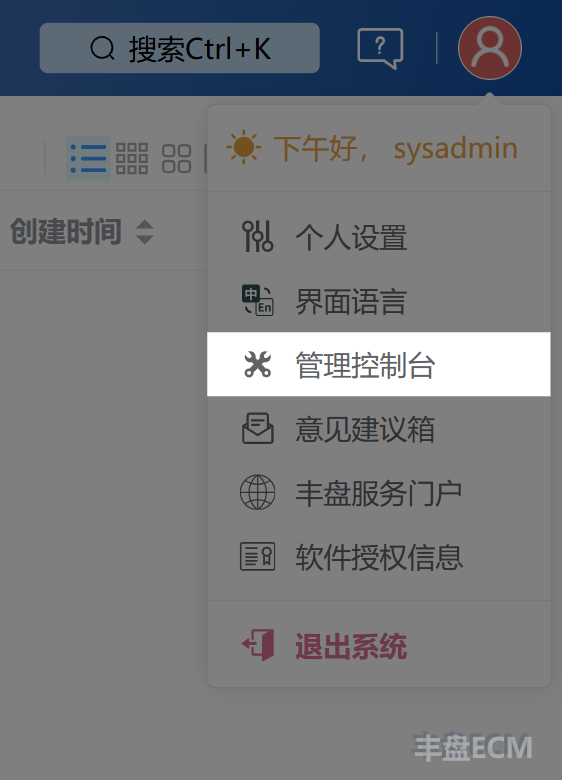
Read Installation and deployment to learn how to install the 丰盘 system. After you install and activate it, sign in with the built-in super administrator account sysadmin, then click "Admin Console" in the avatar menu at the top right to open the Admin Console. The Admin Console is the backend where super administrators maintain the global configuration of the system. Regular users cannot view or use any feature in the Admin Console. There you can maintain the organization structure, create and edit user accounts, configure the online preview service, set storage quotas for a whole disk or a single space, and more.
All important 丰盘 data lives in the /opt/xpan/ directory on the host, not inside the Docker containers, so no data is lost even if containers are removed or crash. Once the system is in production, set up a daily or weekly backup plan as described in Backup and restore. This protects important business data from hardware failures such as disk or RAID card faults, and from mistakes during routine operations.
丰盘ECM is document management software deployed privately on your intranet, also known as an enterprise private drive. If you are used to Baidu Netdisk, Windows file sharing, or FTP, your first experience may feel unfamiliar. There are no "My Photos", "My Videos", or "My Music" sections. You may wonder what a document space is and why documents must be stored in a document space, or why folder permissions are configured in the space management page instead of the folder context menu. Read Quick start before you start using the basic features of 丰盘ECM.
If you run into a problem, use "Site Search" in the lower-right corner of this website to find related documentation, or check the server operations log as described in Troubleshooting. If that does not solve your problem, contact us.