Linux server operations
To operate the 丰盘 system effectively, read 丰盘 system operations architecture first for the overall architecture. The 丰盘 system is built on Docker. If Docker is new to you, read Why 丰盘 is built on Docker.
To reduce the workload on administrators, common operations are wrapped in command-line (CLI) tool scripts. With the CLI tool, you can easily change the web access port from 80 to another port and enable or disable HTTPS. For details, see CLI helper tool.
Configure Linux time and time zone
All containerized components of the 丰盘 system synchronize with the system time of the host. Its accuracy therefore affects the operation logs written to the database, plus the timestamps of files and folders. If time synchronization fails, it may also invalidate the checks used in encrypted communication between some components and produce puzzling failures. Correct system time matters in production environments.
Run timedatectl (or date if that command is unavailable or fails) to check the Linux system time and time zone; the key line is Local time:
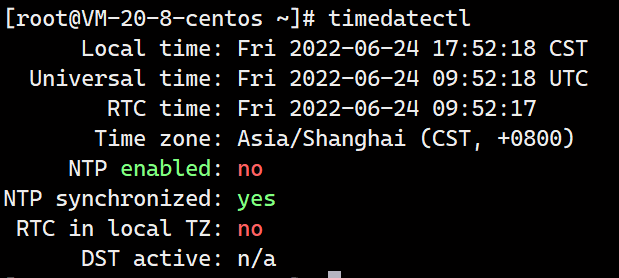
Virtual hosts created with VMware, HyperV, KVM, or VirtualBox usually keep time in sync with the host, so you only need to make sure the host time is correct.
If the time zone is wrong, set it to China Standard Time (UTC+8) with the following command:
sudo timedatectl set-timezone Asia/ShanghaiAfter installation, you can also open the following URL in a browser to check whether server time is correct:
http://[server-IP]:[port]/api/v1/op/time
Example output: "2021-03-24 14:26:44"Configure startup on boot
After the server shuts down and restarts, neither the Docker service nor the related 丰盘 container processes start automatically. When users open the system, the browser reports that the response took too long and the site is unreachable. See Start 丰盘 services on boot for how to start the system.
Disk expansion and data directory migration
The 丰盘 data directory lives in /opt/xpan/ on the host, and that directory usually occupies capacity on the system disk. As 丰盘ECM is used more heavily, the disk may raise capacity alerts. You may also want to persist 丰盘ECM data on a different system disk. For details, see How do I expand a full system disk, and how do I migrate the data directory?.
Troubleshooting and log collection
When a problem occurs while using the 丰盘 system, the error message usually appears in the interface, and retrying as prompted solves most cases. If the error code is 5000 or falls in the 5xxx range, something went wrong in the backend service. Those errors involve technical details that ordinary users cannot resolve, so a system administrator must investigate.
Sign in to the server that hosts 丰盘, then open the logs under /opt/xpan/logs/. The api directory holds runtime logs of the main product programs, and ota holds logs for version upgrades and licensing. See System architecture for the directory layout. Use the tail command to view the last 100 lines; replace the file name with the actual one:
tail -n100 /opt/xpan/logs/api/2024-03-23.log
tail -n100 /opt/xpan/logs/ota/2024-03-23.logAlternatively, compress the whole log directory with the following command and send us the xpanlogs.tar.xz file for diagnosis:
tar -cJvPf ~/xpanlogs.tar.xz /opt/xpan/logs