Why 丰盘ECM is built on Docker
丰盘ECM is built on Docker. This chapter introduces the Docker basics so you can better understand the system architecture. Skip this chapter if you already know Docker well.
Challenges of traditional IT operations
As technology evolves, server software architecture grows more complex, and a single technology stack rarely solves every problem. Most software combines components built on several stacks. A simple browser-server application, for example, typically has three very different components: a static HTML front end, an API service, and a database.
With traditional operations, you first install the database on a Linux or Windows host, and the procedure differs greatly between operating systems. Even on Linux, binary packages may be incompatible across distributions or CPU architectures such as x86, ARM, and MPIS, and source builds depend on a different compiler environment and flags. An administrator used to MySQL or PostgreSQL cannot always configure the other one quickly.
Then you deploy the backend API service. If the vendor uses PHP, you need a PHP runtime, and a PHP environment configured for web FastCGI differs from a standalone one. If the service runs on Java or .NET, you need the matching JVM or CLR runtime, with the same deployment differences across operating systems. If the API is split into microservices, as is common today, one component becomes many, and you also need an aggregation gateway as a reverse proxy so the browser does not have to reach several ports. The architecture becomes more complex again.
The static HTML front end is the simplest part, but it still leaves many choices. You can host it directly through PHP, Java, or .NET, or use a pure web server such as nginx or Apache for better performance, and the details differ in each case. Enabling an HTTPS certificate takes a very different configuration in each environment.
The last step is to configure communication between components. The site the browser visits must know which address serves the API, and the API service must know the database port. Every company has its own operations policy, and some ports are not allowed.
All of this applies to a fairly simple application.
The workload this creates is considerable. Vendor engineers spend a lot of time adapting to each environment, while customer administrators must assemble a workable setup from many options and resolve scenarios the official documentation does not cover.
How Docker solves the problem
With Docker, how do you install a PostgreSQL database?
Once Docker is installed on a supported operating system, a step that is fairly simple, one command starts a PostgreSQL instance with identical configuration on every Linux distribution, on Windows, and on x86 or ARM CPUs.
docker run -d --name pgsql -e POSTGRES_PASSWORD=123456 -p 5432:5432 postgresThe postgres at the end of the command is an image packaged by the PostgreSQL open-source community; we explain images later. If we configure PostgreSQL according to best practices and preinstall the database plugins our software depends on, we can repackage it as an image named xpan-db in a public registry. Users then change the image name and rerun the command to get our preconfigured environment immediately.
docker run -d --name pgsql -e POSTGRES_PASSWORD=123456 -p 5432:5432 xpan-dbEngineers familiar with automation scripts may argue that one-click install scripts are easy to find online and work on any operating system. In practice, most scripts are highly sensitive to their environment and fragile: one conflicting library version on the host can make them fail. When software contains several components, when those components use different versions of the same library, and when they depend on each other logically and over the network, script-based automation becomes error-prone and hard to maintain. More importantly, many components across many stacks have no stable one-click script at all, so vendor engineers have to build the automation themselves.
One core value of Docker is that image files deliver the precondition for automation, standardization. For both system administrators and vendor engineers, automation built on Docker images is easier and more maintainable. Images maintained by different companies can even reference or extend each other for heavy reuse, so nobody has to reinvent the wheel. Development and test environments also stay consistent with what end users run, which avoids problems caused by deployment differences.
Distribute software built from multiple components
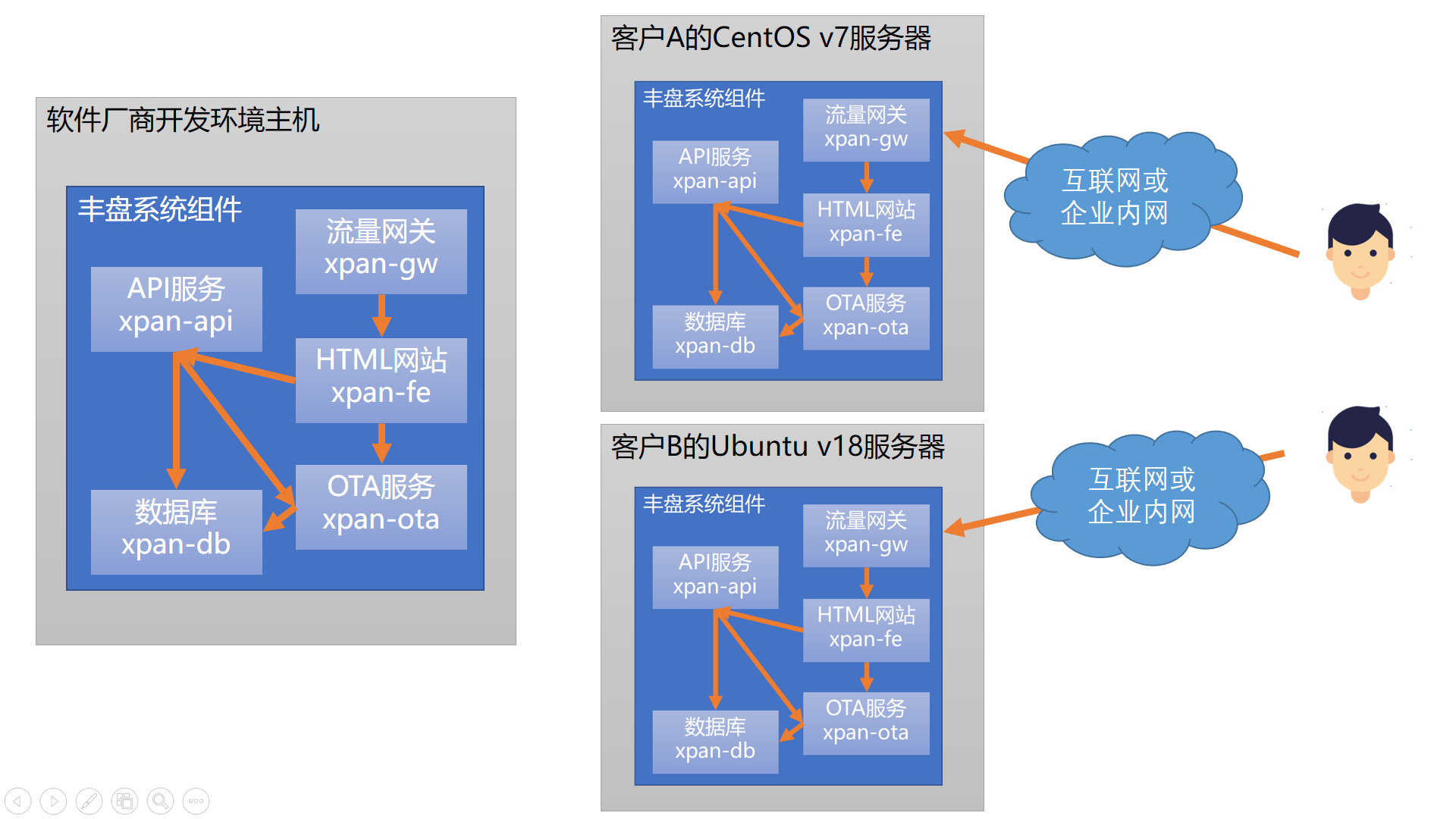
丰盘ECM includes a database, an API service, an OTA service, a static HTML site, and a traffic gateway. As a vendor, we only need to preconfigure each component and predefine the network links between them in the build environment, and then ship the whole system. Whatever the customer runs, CentOS, Ubuntu, or even the latest Windows, a few similar commands complete the deployment in about ten minutes. About 99% of that time goes to downloading image files to the machine; the actual deployment takes seconds.
The process resembles container shipping at a port: complex cargo is packed into a container in advance and then moved onto any vessel in one go. That is why the official Docker logo is a whale carrying containers.

This approach is close to virtualization products such as VMware, Hyper-V, KVM, and Xen. Docker is also a virtualization technology, but an extremely lightweight one next to traditional virtual machines. Docker began as a toolchain for managing isolated virtual environments built on the native Linux kernel features cgroups and namespaces. Virtual machines require deep kernel changes to virtualize resources, whereas Docker does not modify the kernel at all; it relies on features the kernel already provides.
Instead of distributing software binaries as in traditional operations, Docker distributes image files. An image contains the binaries and, more importantly, the environment and configuration the software depends on, and that environment usually includes the operating system. Whether you install 丰盘ECM on Ubuntu or CentOS, every component container actually runs on Debian 11. To upgrade a component, you replace the whole container, which is a running instance of an image, with a new image, much like swapping a screw.

Network and resource isolation
Besides solving build and distribution, a second core value of Docker is isolation between multiple software systems on one machine, covering the network and CPU and memory resources. A single machine can run thousands of Docker containers, whereas a physical server running a dozen virtual machines is already a good result, since the guest operating systems alone add overhead that is hard to ignore.
Learn more
To learn Docker in more depth, visit the official Docker website: Get Started with Docker.