Configure China-based yum mirrors after CentOS end of life
CentOS is the downstream community build of the commercial Red Hat Enterprise Linux release. Its excellent stability and LTS support made it a favorite with enterprise customers. 丰盘ECM, an enterprise document management product for private deployment, originally recommended CentOS as the preferred operating system for stability and reliability.
After IBM acquired Red Hat at the end of 2018, Red Hat changed its release strategy and introduced CentOS Stream, moving CentOS from a downstream branch of Red Hat Enterprise Linux to an upstream branch. CentOS effectively became a testing ground for new Red Hat features. Later official CentOS Stream releases would change code more often and include experimental features, so the earlier stability advantage was gone.
On June 30, 2024, support for the last LTS release of CentOS ended, and the official yum repositories were retired. If your organization still runs an older CentOS 7 or 8 release, every yum install command run by your Linux administrators fails, so Docker and 丰盘ECM cannot be installed either.
Several options are available.
- Switch the built-in yum repositories to a third-party mirror site in China.
- Upgrade to CentOS Stream; CentOS Stream 9, for example, is supported until 2027.
- Replace it with a binary-compatible distribution such as Rocky Linux, AlmaLinux, or Anolis OS, which keeps operations and habits similar.
- Move to another mainstream distribution such as Debian or Ubuntu. These are not binary compatible with CentOS, and operations differ considerably.
This document covers the first option: switch an older CentOS release to a mirror site available in China. After the switch, you can run the 丰盘 automated installation script to deploy the system quickly.
1. Back up the original yum repository configuration
Move the built-in or manually configured yum repository files to a new directory, such as /etc/yum.repos.d/bak240712/, so you can restore or reset them later. If you leave them in place, the old files may make the final "Rebuild the local cache" step fail.
# Create the backup folder
sudo mkdir -p /etc/yum.repos.d/bak$(date +"%y%m%d")
# Move the repository files into the backup folder
sudo mv /etc/yum.repos.d/*.repo /etc/yum.repos.d/bak$(date +"%y%m%d")2. Download yum configuration files from Alibaba Cloud and other mirrors
Many well-known yum mirror sites operate in China. Start with the mirrors of the three major public cloud providers (Alibaba Cloud, Tencent Cloud, and Huawei Cloud), which are stable to access. Pick one of the three options below, based on your experience with those cloud services and their download speed.
Alibaba Cloud
For Alibaba Cloud, visit https://mirrors.aliyun.com/repo/ to see the available mirror list.
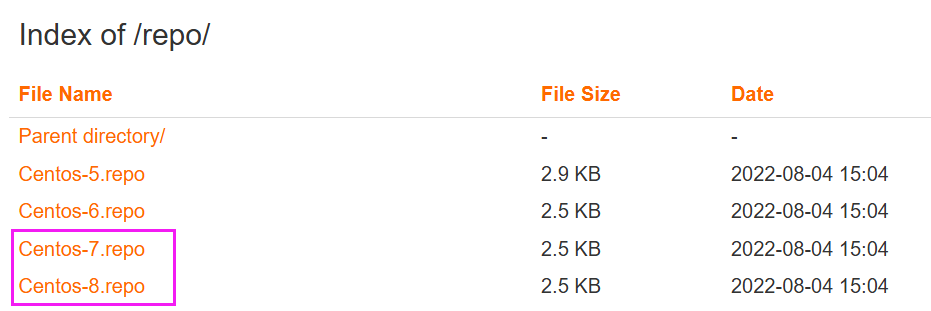
In a Linux terminal, download the yum configuration file that matches your operating system version. Docker cannot be installed on CentOS 6, so this document uses CentOS 7.9, which is widely used in the industry.
# Recommended for CentOS 7
sudo wget -O /etc/yum.repos.d/Centos-Base.repo http://mirrors.aliyun.com/repo/Centos-7.repo

# CentOS 8
sudo wget -O /etc/yum.repos.d/Centos-Base.repo http://mirrors.aliyun.com/repo/Centos-8.repoThen download the EPEL repository configuration file.
EPEL (Extra Packages for Enterprise Linux) is a project that provides extra packages for enterprise Linux distributions. Maintained by the Fedora community, it supplies high-quality add-on packages for these distributions.
# Recommended for CentOS 7
sudo wget -O /etc/yum.repos.d/epel.repo http://mirrors.aliyun.com/repo/epel-7.repo

# CentOS 8
sudo wget -O /etc/yum.repos.d/epel.repo http://mirrors.aliyun.com/repo/epel-archive-8.repoTencent Cloud
As with Alibaba Cloud, the Tencent Cloud mirror site is at https://mirrors.cloud.tencent.com/repo/.
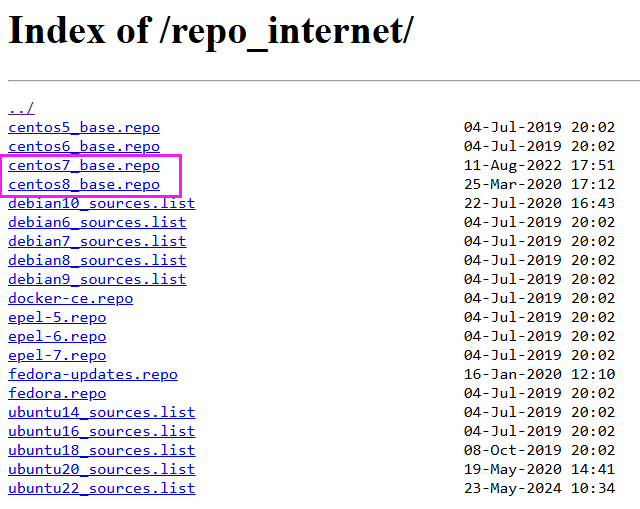
In a Linux terminal, download the yum configuration file that matches your operating system version.
# Recommended for CentOS 7
sudo wget -O /etc/yum.repos.d/Centos-Base.repo http://mirrors.cloud.tencent.com/repo/centos7_base.repo

# CentOS 8
sudo wget -O /etc/yum.repos.d/Centos-Base.repo http://mirrors.cloud.tencent.com/repo/centos8_base.repoDownload the EPEL repository configuration file (CentOS 7 only).
# Recommended for CentOS 7
sudo wget -O /etc/yum.repos.d/epel.repo http://mirrors.cloud.tencent.com/repo/epel-7.repoHuawei Cloud
As with Alibaba Cloud, the Huawei Cloud mirror site is at http://mirrors.huaweicloud.com/repository/conf/.
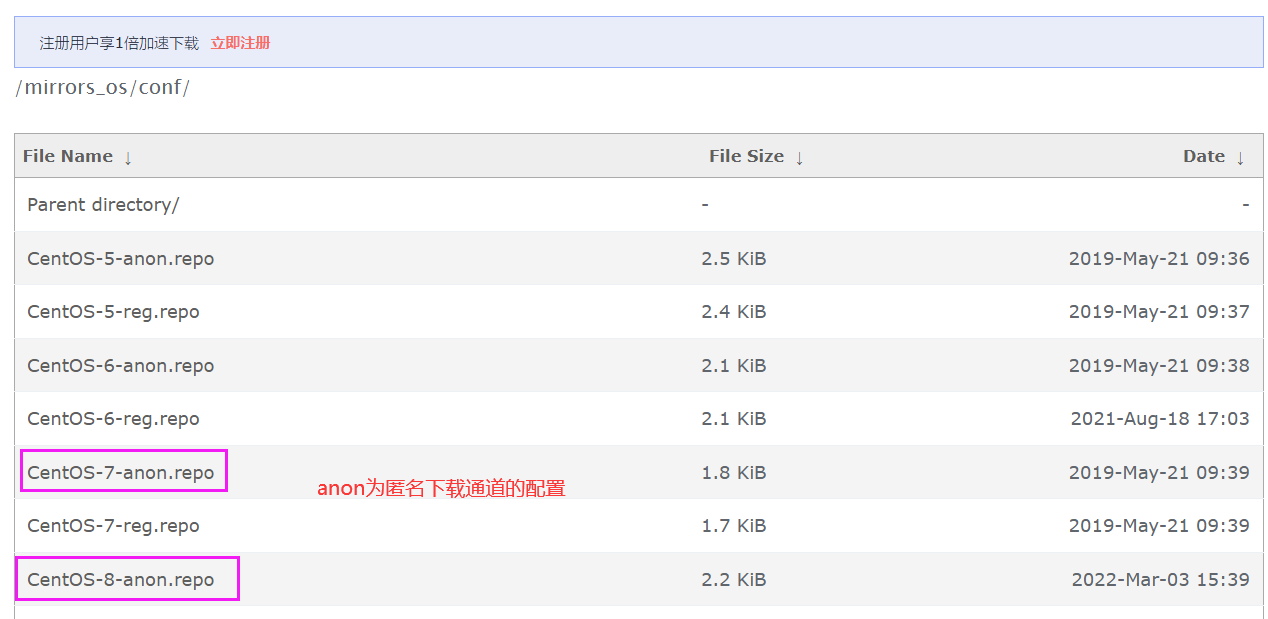
In a Linux terminal, download the yum configuration file that matches your operating system version.
# Recommended for CentOS 7
sudo wget -O /etc/yum.repos.d/Centos-Base.repo http://mirrors.huaweicloud.com/repository/conf/CentOS-7-anon.repo

# CentOS 8
sudo wget -O /etc/yum.repos.d/Centos-Base.repo http://mirrors.huaweicloud.com/repository/conf/CentOS-8-anon.repoDownload the EPEL repository configuration file (CentOS 7 only).
# Recommended for CentOS 7
sudo wget -O /etc/yum.repos.d/epel.repo http://mirrors.huaweicloud.com/repository/conf/epel-7-anon.repo3. Rebuild the local cache
# Run these two commands to rebuild the local cache and apply the changes
sudo yum clean all && yum makecache

# Test whether package installation works
sudo yum install curl wgetAfter this configuration, you should be able to install Docker and other Linux packages normally.
Further reading